Manufacturing plants have digitized production, maintenance, quality, inventory, and asset management. Yet consistent execution on the shop floor still depends on workarounds. Workers search for the latest procedures, rely on verbal handovers, or turn to experienced colleagues when something goes wrong.
Though Lean manufacturing provides a blueprint for standardized work and continuous improvement, sustaining those improvements depends on every technician, operator, and inspector having the right information at the point of work. Without that, processes gradually drift, knowledge stays with individuals, and variation creeps back into day-to-day operations.
This is why manufacturers are moving frontline work onto connected worker platforms. In this guide, we'll break down what a connected worker platform is, how it supports Lean operations, what capabilities it offers, and how to evaluate whether it's the right fit for your manufacturing environment.
What Is a Connected Worker Platform?
A connected worker platform is the digital workspace used by frontline employees to perform their jobs. It centralizes work instructions, inspections, collaboration tools, and operational data onto a single interface, while syncing with enterprise systems such as the CMMS, MES, ERP, and quality management system.
For instance, if a maintenance technician had to complete a work order, they’d have to open one system for the work order, another for equipment history, a shared drive for the latest procedure, and a messaging app to ask a supervisor a question (if any). But with a connected worker platform, the technician can access all of this under the same workflow, making it easier to review procedures, record inspection readings, attach photos, report issues, and request expert help without switching between multiple tools.
Quick reference:
A connected worker is a frontline employee who can access the information, tools, and support they need through a single digital interface while they work.
Why Do Connected Worker Platforms Matter?
Over the last decade, the manufacturing industry has shifted toward more efficient processes: machine data is captured in real time, production is tracked through MES, maintenance is managed in a CMMS, and quality and compliance records are stored digitally.
But frontline work hasn't evolved at the same pace. You’ll notice that technicians still manually search for the latest procedures, while machine operators rely on the previous shift staff to troubleshoot recurring faults. Your workers are spending valuable time searching for the correct information to complete their work successfully.
And with products becoming more complex, manufacturers expanding across multiple facilities, and experienced workers retiring while new employees are still getting up to speed, these workarounds become difficult to manage. Deloitte and The Manufacturing Institute’s 2024 survey states that 2.8 million of the 3.8 million manufacturing jobs expected to open by 2033 will be driven by retirements. That's millions of experienced workers taking years of practical knowledge with them unless manufacturers have a reliable way to capture and transfer it.
A connected worker platform helps you to bridge all these gaps. It provides frontline teams with a single point of access to instructions, enables them to complete work, captures operational data, and facilitates collaboration with experts. The result is more consistent execution across shifts, facilities, and teams, making Lean practices easier to implement and sustain.
What Are the Key Features of a Connected Worker Platform?
Connected worker platforms differ from vendor to vendor. But most of them come equipped with the same core capabilities. These capabilities are typically available across devices (desktops, tablets, smartphones, wearables, etc.), allowing workers to access the same workflows regardless of the shift or location.
Digital Work Instructions and Guided Procedures
Standardized work is the foundation of Lean manufacturing. But ensuring its implementation step-by-step is a challenge, especially if your workers are still dependent on paper SOPs.
Connected worker platforms replace paper SOPs with guided digital workflows that combine checklists, images, videos, and step-by-step guidance. Workers can access the latest approved processes, ensuring standardized work is followed across shifts, lines, and facilities.
For example, Volkswagen's dealer network saw its warranty cycle time drop by 45% once technicians followed the current standardized procedure instead of their old paper version.
Data Capture, Forms, and Inspections
Connected worker platforms help workers to complete inspections, record measurements, upload photos, and report defects as they perform the task. This ensures that the information is captured in real time and becomes proof of work that supports compliance, audits, and continuous improvements. Since lean operations depend on reliable data from the shop floor, this feature is non-negotiable.
n reliable data from the shop floor, this feature is non-negotiable.
Remote Assistance and Expert Support
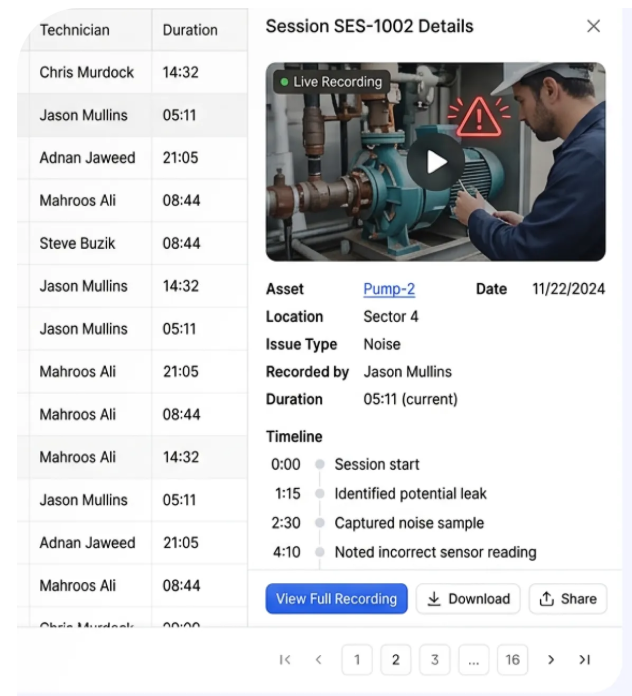
When a worker encounters an error, the right expert might not be available to guide them through the error sorting process. Connected worker platforms are equipped with built-in video calls, live annotations, and shared operational context (screen sharing or augmented reality tools) that let experienced technicians guide workers remotely.
For example, a field technician troubleshooting an unfamiliar equipment fault can start a video call directly from the work order. The expert on call sees the equipment in real time, walks the technician through the repair, and the interaction is documented for future reference.
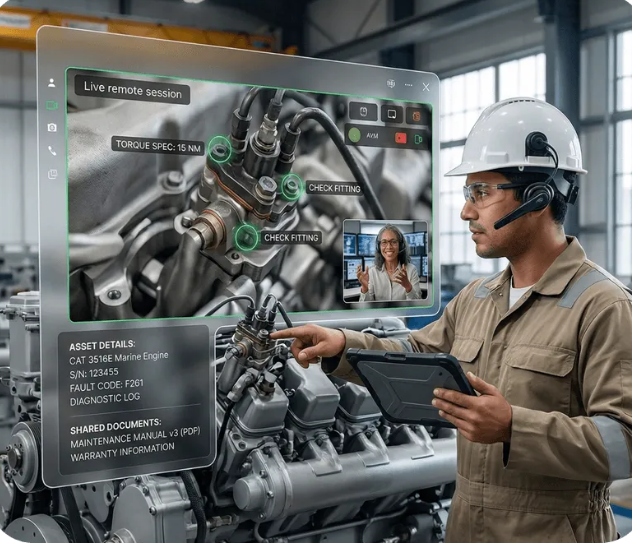
Source: Atheer.com
Training, Skills, and Competency
One of the biggest challenges is preserving tribal knowledge as experienced workers retire. The problem is worsened by the shortage of skilled applicants - more than 50% of manufacturing positions remain vacant because candidates lack the required skills - making faster onboarding and knowledge transfer even more important.
Connected worker platforms make knowledge easier to share. It integrates training into everyday work through guided procedures, digital learning resources, and competency tracking. With help on hand, new employees become productive faster while preserving the expertise of experienced workers.
This is especially valuable for manufacturers where lengthy onboarding creates operational bottlenecks. Gatekeeper Systems, for example, eliminated a training bottleneck that was slowing technician onboarding, achieving a 20× ROI and saving $2.7 million annually.
Analytics and Operational Insights
Continuous improvement depends on understanding how each task is performed, capturing accurate data from completed tasks, inspections, and maintenance activities. Connected worker platforms connect this information, helping teams identify recurring issues, monitor compliance, and support Kaizen initiatives.
AI and Generative Authoring
Traditionally, SOPs have been created and maintained manually, even when procedures changed frequently. But with AI, the effort of creating and maintaining guided workflows becomes much easier. You can convert existing SOPs into digital workflows, generate draft work instructions, translate procedures, and help workers find answers using natural language search. Some platforms also provide in-the-flow AI assistance, suggesting next steps based on the worker's role, asset, and task.
How Does a Connected Worker Platform Work?
A connected worker platform acts as a digital layer between your enterprise systems and frontline workers. It connects your ERP, MES, CMMS, EAM, or QMS to pull the information workers need and pushes completed data back into those systems.
Most platforms are cloud-based, support mobile and web applications, and work across smartphones, tablets, desktops, rugged devices, and even AR wearables. Many also support offline work, automatically syncing data once the device reconnects.
Once connected, a typical workflow looks like this:
- A task is assigned.
A work order, inspection, production task, or safety checklist is created in an enterprise system such as a CMMS or MES. The platform automatically routes it to the right worker based on their role, location, or skill set.
- The worker receives everything in one place.
The worker accesses the task on their work device. Alongside the work order, they see guided workflows, equipment history, safety procedures, manuals, inspection forms, and any other information needed to complete the job.
- Work is completed in context.
As the task progresses, workers record measurements, upload photos or videos, scan barcodes, complete inspections, and report issues directly within the workflow. If they need help, they can connect with a remote expert through video or annotations without leaving the application.
- Proof of work is automatically created.
Every completed step, inspection result, image, signature, and observation is captured digitally, creating a complete record of how the task was performed.
- Enterprise systems are updated automatically.
Once the job is complete, the platform synchronizes the collected data with systems like the CMMS, ERP, MES, or QMS. Supervisors gain real-time visibility into completed work, while operations teams can utilize that data to improve procedures, support compliance, and drive future Kaizen initiatives.
What Are the Benefits and ROI of a Connected Worker Platform?
Most of the benefits of a connected worker platform come from consistent frontline execution. Once workers start following the standardized process, improvements begin to show across operations.
- Standardized work becomes easier to maintain across shifts, facilities, and teams.
- Issues get resolved faster since workers can access equipment history, troubleshooting guides, and remote experts from the same workflow.
- Supervisors gain better visibility into frontline operations because every completed task creates a digital record of what was done, who performed it, and any deviations that occurred.
- Compliance and audit readiness improve as photos, measurements, inspection results, timestamps, and digital signatures are captured automatically during execution, creating proof of work.
- Continuous improvement becomes easier to sustain because every workflow generates execution data that helps teams identify recurring issues, improve processes, and support future Kaizen initiatives.
- Manufacturers get more value from existing enterprise systems as accurate and real time execution data flows back into ERP, MES, CMMS, and QMS, giving frontline teams the operational context they need while keeping enterprise systems up to date.
Atheer's customer deployments show how these operational improvements translate into measurable business outcomes. For example:
- An OEM replaced paper manuals with Atheer’s guided workflows and digital data capture, reducing their service time by 25%.
- When Porsche’s technicians switched to remote expert support for diagnosing and repairing vehicles, their ‘time to resolution’ dropped by 40%.
Connected Worker Platform vs MES, CMMS, LMS & FSM
MES, CMMS, LMS & FSM – Each of these systems serves a different purpose. A connected worker platform acts as a layer between these enterprise systems and frontline workers, keeping the systems in sync at all times.
Which Industries Use Connected Worker Platforms?
Connected worker platforms can be implemented wherever frontline employees perform complex, repetitive, or safety-critical tasks. While manufacturing is one of the largest adopters, the technology is used across many asset-intensive industries.
How to Choose a Connected Worker Platform
Every connected worker platform promises to digitize frontline work. The difference lies in how well it fits your operations, integrates with your existing systems, and supports the workflows that matter most. Before evaluating vendors, ask yourself:
- Where do workers lose the most time?
Searching for SOPs, waiting for approvals, looking for experts, or manually entering data?
- Which frontline processes are still paper-based?
Maintenance, inspections, quality checks, shift handovers, or safety audits?
- Can the platform integrate with the systems you already use?
Look for support for your ERP, MES, CMMS, QMS, or EAM instead of another standalone application.
- Will it work where your employees work?
The platform should support mobile devices, tablets, rugged devices, wearables, and offline environments if connectivity is limited.
- Can supervisors measure adoption and outcomes?
Beyond digitizing workflows, the platform should provide visibility into execution, compliance, and opportunities for continuous improvement.
Once you have the answers, you can shortlist platforms that best fit your requirements.
Quick Tip:
Choose a platform that your frontline team can adopt with minimal training. It should fit naturally into the way they already work, capture proof of work automatically, and give supervisors clear visibility into frontline execution.
A platform with intuitive user interface is far more likely to deliver long-term value than a solution that's feature-rich but difficult to use.
How Atheer Can Help
If your goal is to simply replace paper forms, any digital workflow tool is good enough. But if you want to standardize frontline execution, preserve operational knowledge, connect workers with the systems that already run your business, and turn those improvements into measurable business outcomes, you need a platform that’s built for industrial operations, like Atheer.
As a connected work execution platform, Atheer brings all the core features, plus a few others like AI-powered knowledge, into a single experience. It seamlessly integrates with enterprise systems like ERP, MES, CMMS, and EAM, giving frontline workers the operational context they need while feeding execution data back into those systems to support continuous improvement.
With Atheer, you’ll see higher productivity of your frontline workers with faster access to accurate and immediate guidance for their tasks.
And as a manufacturer, you gain access to execution data needed to measure outcomes like reduced downtime, faster onboarding, higher SOP compliance, and overall return on investment.
For instance, a loss prevention and cart solution provider used Atheer to resolve a first-time-fix problem. Thirty percent of their installations turned into a return visit before real-time support was in place. With Atheer, the company estimates saving approximately $60,000 a year by reducing repeat visits, along with a 15% drop in installation time and a 30% drop in call volume to its support team.
Want to analyse the execution gap on your shop floor? Team Atheer can walk you through the process.
Conclusion
Implementing a connected worker platform is not just a technology project, but a change in how work gets done on the shop floor every day.
The most successful connected worker implementations understand that a maintenance technician opts for the best way to complete their job correctly - whether it's manual or not. The implementation, therefore, begins with a single workflow, involves the people doing the work, refines the process, and then expands gradually.
Lean has always been about making work simpler, more consistent, and easier to improve. A connected worker platform supports that goal by making the right way of working the easiest way to work.
Want to see what a connected worker platform looks like on your floor? Book a demo with Atheer.